Monday, January 10, 2011
*♥*I'm not ur babe-TUT*♥*

For this tutorial, you’ll need a working knowledge of PSP.
I’m using PSP 9 but any version should work.
This tutorial is my own and any resemblance to any other is purely coincidental.
Supplies for this tutorial:
PSP (any version)
Scrap kit of choice.
I’m using the PTU collab kit ’Pink Desire’ I’m using the part by Tammy’s Scraps
Be sure to check out her blog: http://tammysscraps.blogspot.com/
Tube of choice-Eugene Rzhevskii
You can get his tubes here: www.picsfordesign.com
You MUST have a license to use these tubes. Don’t use them without a license!
Template by Me-here on my blog.
Mask 89 by Vaybs here: http://designsbyvaybs.blogspot.com/
Plugins- Xero Fritillary
This is going to be quick and simple.
Let’s begin:
Open your template & remove the copyright layer.
Select a paper from your kit-Copy it.
Back to your template. Select the back left circle with your magic wand
Paste paper as new layer.
Selections-Invert-Select none.
Do the same for the other circle.
Select the Heart Frame 1 from your kit.
Copy it. Paste over your left circle-Re size to fit over the circle.
Duplicate this layer and mirror.
Adjust to position it over the right circle.
Add drop shadow to each heart frame layer.
Select the grey rectangle with your magic wand.
Flood fill it black. Add the weave effect with the following settings:
Gap-1 Width-4 Opacity1 Fill gaps- checked. Both colors White. (ok)
Select the Braided Ric Rac 1 from your kit. Copy and paste over the rectangle.
Resize and position.
Duplicate & flip.
Move to the bottom part of the rectangle.
Select the center heart on the template with your magic wand.
Add fritillary settings of your choice to it.
Select none.
Select the Diamond rain 1 element from your kit.
Copy and paste it over your heart. Resize and crop any part of it hanging out.
Paste your tube and erase to fit into your heart.
Select the white roses. Paste over your tube layer.
Re size as needed. Duplicate-mirror.
Add drop shadow to each rose.
Select the ‘BABE’ word art with your magic wand. Add glass effect (or inner bevel) of your choice.
Add noise & de select.
Merge Visible.
Select a paper from your kit-Paste as new layer & move below your tag.
Apply your mask.
Merge visible.
Crop. Resize. Add your © info and any name you want.
Save and enjoy your new tag!
I’m using PSP 9 but any version should work.
This tutorial is my own and any resemblance to any other is purely coincidental.
Supplies for this tutorial:
PSP (any version)
Scrap kit of choice.
I’m using the PTU collab kit ’Pink Desire’ I’m using the part by Tammy’s Scraps
Be sure to check out her blog: http://tammysscraps.blogspot.com/
Tube of choice-Eugene Rzhevskii
You can get his tubes here: www.picsfordesign.com
You MUST have a license to use these tubes. Don’t use them without a license!
Template by Me-here on my blog.
Mask 89 by Vaybs here: http://designsbyvaybs.blogspot.com/
Plugins- Xero Fritillary
This is going to be quick and simple.
Let’s begin:
Open your template & remove the copyright layer.
Select a paper from your kit-Copy it.
Back to your template. Select the back left circle with your magic wand
Paste paper as new layer.
Selections-Invert-Select none.
Do the same for the other circle.
Select the Heart Frame 1 from your kit.
Copy it. Paste over your left circle-Re size to fit over the circle.
Duplicate this layer and mirror.
Adjust to position it over the right circle.
Add drop shadow to each heart frame layer.
Select the grey rectangle with your magic wand.
Flood fill it black. Add the weave effect with the following settings:
Gap-1 Width-4 Opacity1 Fill gaps- checked. Both colors White. (ok)
Select the Braided Ric Rac 1 from your kit. Copy and paste over the rectangle.
Resize and position.
Duplicate & flip.
Move to the bottom part of the rectangle.
Select the center heart on the template with your magic wand.
Add fritillary settings of your choice to it.
Select none.
Select the Diamond rain 1 element from your kit.
Copy and paste it over your heart. Resize and crop any part of it hanging out.
Paste your tube and erase to fit into your heart.
Select the white roses. Paste over your tube layer.
Re size as needed. Duplicate-mirror.
Add drop shadow to each rose.
Select the ‘BABE’ word art with your magic wand. Add glass effect (or inner bevel) of your choice.
Add noise & de select.
Merge Visible.
Select a paper from your kit-Paste as new layer & move below your tag.
Apply your mask.
Merge visible.
Crop. Resize. Add your © info and any name you want.
Save and enjoy your new tag!
I'm not your babe-TEMPLATE

*♥*Heart Suckers FREEBIE*♥*


Sunday, January 9, 2011
*♥*I love you Tut*♥*

For this tutorial, you’ll need a working knowledge of PSP.
I’m using PSP 9 but any version should work.
This tutorial is my own and any resemblance to any other is purely coincidental.
Supplies for this tutorial:
PSP (any version)
Scrap kit of choice.
I’m using the PTU kit: Love Bug By Tammy’s Scraps
You can get her kits here: http://www.scrappetizing.com/store/
Be sure to check out her blog: http://tammysscraps.blogspot.com/
Tube of choice-I’m using only those in the scrap kit!
Template by Me-here on my blog.
This is going to be quick and simple.
Let’s begin:
Open your template & remove the copyright layer.
Select a paper from your kit-Copy it.
Select one of the skinny rectangles in the background with your magic wand.
Paste paper as new layer-Selections-Invert-Delete-Select none.
Do this for each of the skinny rectangles.
Select the inside of the heart with your magic wand.
Select another paper from your kit and copy it.
Back to your canvas-Paste as new layer-
Selections-Invert-Delete-Select none.
Do the same for the opposite heart.
You can use the same paper or a different one if you’d like.
Now you can select whatever elements you want to use in your tag.
I used the large frog for the center of my tag (he’s adorable!)
Resize and add drop shadow of your choice.
I added the roses at his feet--Resize and add drop shadow of choice.
Add your bear to the left side of your tag-Resize.
Duplicate and mirror.
Add drop shadow to each little bear.
The heart swirly element, I added behind the bigger oval.
Mirrored it and move it over to the left.
Duplicated & mirrored so it was on the right side of the tag as well.
Add drop shadow to each one.
Select a color from your kit or tube if you used one.
Type out the name you want on your tag.
Add drop shadow.
Add copyright info.
Crop your tag and resize as needed.
Save & enjoy your new tag!
I’m using PSP 9 but any version should work.
This tutorial is my own and any resemblance to any other is purely coincidental.
Supplies for this tutorial:
PSP (any version)
Scrap kit of choice.
I’m using the PTU kit: Love Bug By Tammy’s Scraps
You can get her kits here: http://www.scrappetizing.com/store/
Be sure to check out her blog: http://tammysscraps.blogspot.com/
Tube of choice-I’m using only those in the scrap kit!
Template by Me-here on my blog.
This is going to be quick and simple.
Let’s begin:
Open your template & remove the copyright layer.
Select a paper from your kit-Copy it.
Select one of the skinny rectangles in the background with your magic wand.
Paste paper as new layer-Selections-Invert-Delete-Select none.
Do this for each of the skinny rectangles.
Select the inside of the heart with your magic wand.
Select another paper from your kit and copy it.
Back to your canvas-Paste as new layer-
Selections-Invert-Delete-Select none.
Do the same for the opposite heart.
You can use the same paper or a different one if you’d like.
Now you can select whatever elements you want to use in your tag.
I used the large frog for the center of my tag (he’s adorable!)
Resize and add drop shadow of your choice.
I added the roses at his feet--Resize and add drop shadow of choice.
Add your bear to the left side of your tag-Resize.
Duplicate and mirror.
Add drop shadow to each little bear.
The heart swirly element, I added behind the bigger oval.
Mirrored it and move it over to the left.
Duplicated & mirrored so it was on the right side of the tag as well.
Add drop shadow to each one.
Select a color from your kit or tube if you used one.
Type out the name you want on your tag.
Add drop shadow.
Add copyright info.
Crop your tag and resize as needed.
Save & enjoy your new tag!
*I love you template*
Here is my newest template.
Good for all of those fabby Valentine's taggies!!
Personal use only. Please send to my blog to download.

Download HERE
*♦*Happy Birthday!*♦*

Yesterday was my birthday.
So I used one of Tammy's adorable kits to make this little taggie.
Check out her blog HERE for info on where to get her awesome kits!
Friday, January 7, 2011
*♥*Hush Tutorial*♥*
With this tut-I have reached 100 posts on my blog! YAY!! Thanks everyone for the support & kind words!! I sooo appreciate you!!

For this tutorial, you’ll need a working knowledge of PSP.
I’m using PSP 9 but any version should work.
This tutorial is my own and any resemblance to any other is purely coincidental.
Supplies for this tutorial:
PSP (any version)
Scrap kit of choice.
I’m using the PTU kit: Counting Sheep By Tammy’s Scraps
You can get her kits here: http://www.scrappetizing.com/store/
Be sure to check out her blog: http://tammysscraps.blogspot.com/
Tube of choice. I’m using is by Lia-This is an FTU artist!
Check out her website here: www.linmida.com
Template by Sinfully Creative Scraps here: http://sinfullycreativescraps.blogspot.com/?zx=a8ecf0cd80d8dbda
Plugins- Alien skin Xenofex2-Constellation
Let’s begin:
Open your template.
Open a few papers from your kit.
Select your tilted background square with your magic wand.
Copy a paper of your choice-Back to your canvas and Paste as new layer.
Selections-Invert-Delete-Select none.
Select one of the skinny rectangles with your magic wand.
Select a paper from your kit and copy it.
Back to your canvas-Paste as new layer-Selections-Invert-Delete-Select none.
Do the same for the other two skinny rectangles and use a different paper.
Now select the square behind your moon with your magic wand.
Flood fill it with a dark blue color-This is our sky.
Apply the constellation effect --Adjust the settings to your likings (you want it to look like little stars)
Select the moon with you magic wand. Select the yellow paper from the kit-Copy & paste as new layer.
Selections-Invert-Delete-Select none.
Select the little black squares with your magic wand and flood fill with colors to match your kit.
In the top and bottom squares-place a sheep-Resizing and cropping to fit.
In the middle square apply the weave effect: Gap size 1 Width:4 and color white.
Now add your tube so that it looks like she’s laying on the moon.
Add the fence element behind the moon. Resize it and add drop shadow.
Add your grass element. Resize -add drop shadow if you want.
Select your black letters-Select all-float, defloat-Flood fill with color from your kit.
Merge everything and crop down. Resize as needed. Add your name and Copyright info.
Save and enjoy your new tag!!
I’m using PSP 9 but any version should work.
This tutorial is my own and any resemblance to any other is purely coincidental.
Supplies for this tutorial:
PSP (any version)
Scrap kit of choice.
I’m using the PTU kit: Counting Sheep By Tammy’s Scraps
You can get her kits here: http://www.scrappetizing.com/store/
Be sure to check out her blog: http://tammysscraps.blogspot.com/
Tube of choice. I’m using is by Lia-This is an FTU artist!
Check out her website here: www.linmida.com
Template by Sinfully Creative Scraps here: http://sinfullycreativescraps.blogspot.com/?zx=a8ecf0cd80d8dbda
Plugins- Alien skin Xenofex2-Constellation
Let’s begin:
Open your template.
Open a few papers from your kit.
Select your tilted background square with your magic wand.
Copy a paper of your choice-Back to your canvas and Paste as new layer.
Selections-Invert-Delete-Select none.
Select one of the skinny rectangles with your magic wand.
Select a paper from your kit and copy it.
Back to your canvas-Paste as new layer-Selections-Invert-Delete-Select none.
Do the same for the other two skinny rectangles and use a different paper.
Now select the square behind your moon with your magic wand.
Flood fill it with a dark blue color-This is our sky.
Apply the constellation effect --Adjust the settings to your likings (you want it to look like little stars)
Select the moon with you magic wand. Select the yellow paper from the kit-Copy & paste as new layer.
Selections-Invert-Delete-Select none.
Select the little black squares with your magic wand and flood fill with colors to match your kit.
In the top and bottom squares-place a sheep-Resizing and cropping to fit.
In the middle square apply the weave effect: Gap size 1 Width:4 and color white.
Now add your tube so that it looks like she’s laying on the moon.
Add the fence element behind the moon. Resize it and add drop shadow.
Add your grass element. Resize -add drop shadow if you want.
Select your black letters-Select all-float, defloat-Flood fill with color from your kit.
Merge everything and crop down. Resize as needed. Add your name and Copyright info.
Save and enjoy your new tag!!
Wednesday, January 5, 2011
*Jealousy Set*
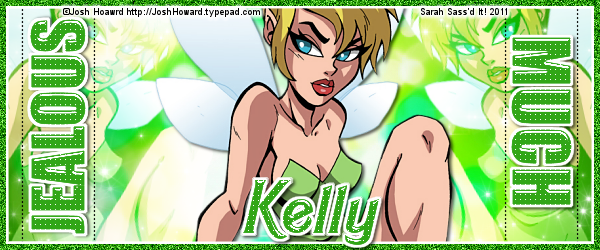
Kelly has a collection of "Wicked in..." Kits. They are awesome!!
For this set, I used her Wicked In Green kit.
Check out her blog HERE for her fab kits.
Green makes me think of jealousy so that was my theme for the set I made for her.
I also used FTU artist Josh Howard--Love these tubes!!
Here is the set I made.


For this set, I used her Wicked In Green kit.
Check out her blog HERE for her fab kits.
Green makes me think of jealousy so that was my theme for the set I made for her.
I also used FTU artist Josh Howard--Love these tubes!!
Here is the set I made.
Subscribe to:
Posts
(
Atom
)


